Gold-Tech: Designing an IoT factory monitoring OS
Gold-Tech: Designing an IoT factory monitoring OS
Gold-Tech: Designing an IoT factory monitoring OS
Designed a factory IoT monitoring dashboard to simplify complex machine data, enabling faster decision-making, reducing monitoring time by 40%, and improving overall operational efficiency.
I designed an IoT-powered ecosystem that
gives factory owners real-time visibility,
reduces downtime, and improves overall operational health.
Service
Industrial IoT / Manufacturing SaaS
Industrial IoT / Manufacturing SaaS
Client
Gold Tech
Gold Tech
What I Do
Web Dashboard, App
Web Dashboard, App
Product Design
IOT Design
Figma AI
Factory App
Sass Platform
Product Design
IOT Design
Figma AI
Factory App
Sass Platform
About this project
About this project
About this project
Modern factories generate massive real-time data through IoT sensors, but most platforms fail to present this data usably — leading to confusion and delayed decisions. This project focused on designing a scalable, intuitive dashboard system that transforms raw machine data into meaningful insights and improves operational efficiency.
Modern factories generate massive real-time data through IoT sensors, but most platforms fail to present this data usably — leading to confusion and delayed decisions. This project focused on designing a scalable, intuitive dashboard system that transforms raw machine data into meaningful insights and improves operational efficiency.
Problem
Manufacturing teams rely on WhatsApp messages, spreadsheets, and manual inspections to track machine health. This leads to delayed issue detection, production downtime, and poor visibility into factory performance.
Manufacturing teams rely on WhatsApp messages, spreadsheets, and manual inspections to track machine health. This leads to delayed issue detection, production downtime, and poor visibility into factory performance.
Design Challenges
Manufacturing teams were working with large amounts of machine and operational data, making it difficult to quickly identify what needed attention and understand what action to take.
Manufacturing teams were working with large amounts of machine and operational data, making it difficult to quickly identify what needed attention and understand what action to take.
The goal
Design a centralized monitoring experience that helps teams:
Understand factory health at a glance
Detect machine issues quickly
Investigate problems
Take operational action
Track progress and resolution
Design a centralized monitoring experience that helps teams:
Understand factory health at a glance
Detect machine issues quickly
Investigate problems
Take operational action
Track progress and resolution
Team
Client
Me (Product Designer)
Product Manager, Engineers
My role
Senior UX/ Product Designer
Tools
Figma, Notion, FigJam, AI Tools
Timeline
4 week
Understand the factory realities
Understand the factory realities
Understand the factory realities
Research was conducted with factory managers and floor technicians across manufacturing environments to understand how they currently monitor machines, respond to issues, and coordinate maintenance.
Research was conducted with factory managers and floor technicians across manufacturing environments to understand how they currently monitor machines, respond to issues, and coordinate maintenance.
Research was conducted with factory managers and floor technicians across manufacturing environments to understand how they currently monitor machines, respond to issues, and coordinate maintenance.
Methods Used
Methods Used
Contextual interviews with factory managers
Observation sessions on factory floors
Task analysis of existing monitoring tools
Journey mapping for both user roles
Contextual interviews with factory managers
Observation sessions on factory floors
Task analysis of existing monitoring tools
Journey mapping for both user roles
Key artifacts produced
Key artifacts produced
UX research notes & synthesis
User journey map (Factory Manager)
User journey map (Technician)
User flow diagrams
Role-based persona definitions
UX research notes & synthesis
User journey map (Factory Manager)
User journey map (Technician)
User flow diagrams
Role-based persona definitions
Two Products, One System
Two Products, One System
Two Products, One System
Managers need a cross-factory overview
Managers need a cross-factory overview
They monitor overall production health and compare issues across machines.
Technicians need machine-level context
Technicians need machine-level context
They typically focus on diagnosing a specific machine and resolving the issue quickly.
Alerts need prioritization
Alerts need prioritization
Not every machine event requires immediate action.
Two Products, One System
Two Products, One System
Two Products, One System
Web Platform
Web Platform
Browser-based dashboard for factory managers. Provides high-level monitoring, zone management, device configuration, manufacturing plans, alerts, and analytics reporting.
Browser-based dashboard for factory managers. Provides high-level monitoring, zone management, device configuration, manufacturing plans, alerts, and analytics reporting.
Real-time IoT floor visualisation (3D)
Zone & device management
Alert center & notifications
Analysis & reporting
Manufacturing plans
Real-time IoT floor visualisation (3D)
Zone & device management
Alert center & notifications
Analysis & reporting
Manufacturing plans
Desktop OS
Desktop OS
Installed desktop application for on-floor operators and technicians. Focuses on task execution, machine health details, maintenance workflows, and setup.
Installed desktop application for on-floor operators and technicians. Focuses on task execution, machine health details, maintenance workflows, and setup.
Operator task management
Machine health dashboard
Maintenance scheduling
Setup & technician config
Reports & scheduling
Operator task management
Machine health dashboard
Maintenance scheduling
Setup & technician config
Reports & scheduling
Key Design Decisions
Key Design Decisions
Problem
Problem
Factory managers and floor technicians were overwhelmed by raw machine data with no way to prioritize what actually needed attention.
Factory managers and floor technicians were overwhelmed by raw machine data with no way to prioritize what actually needed attention.
Chose
Chose
Two connected products sharing one design system — a manager-facing web dashboard for oversight and a technician-facing desktop OS for execution — with critical alerts surfaced first in both.
Two connected products sharing one design system — a manager-facing web dashboard for oversight and a technician-facing desktop OS for execution — with critical alerts surfaced first in both.
Considered
Considered
One unified dashboard for every role vs. role-based views tailored to what each user acts on day-to-day.
One unified dashboard for every role vs. role-based views tailored to what each user acts on day-to-day.
Why
Why
Interviews showed managers scan for cross-floor trends while technicians need the fastest path to a specific broken machine. A single shared view would force a tradeoff neither role needed; splitting by role let each surface optimize for its actual task.
Interviews showed managers scan for cross-floor trends while technicians need the fastest path to a specific broken machine. A single shared view would force a tradeoff neither role needed; splitting by role let each surface optimize for its actual task.
Additional Principles
Additional Principles
Critical information first
Critical information first
In industrial environments, operators cannot afford to hunt for data. High-priority alerts, machine status indicators, and always appear at the top of every view with clear colour-coded severity levels.
In industrial environments, operators cannot afford to hunt for data. High-priority alerts, machine status indicators, and always appear at the top of every view with clear colour-coded severity levels.
Role-based views
Role-based views
Factory managers see strategic overviews and trend data. Technicians see task queues and machine-level diagnostics. The same data, optimised for each role's context and decision needs.
Factory managers see strategic overviews and trend data. Technicians see task queues and machine-level diagnostics. The same data, optimised for each role's context and decision needs.
Reduce cognitive load
Reduce cognitive load
Complex factory data is visualised through clear charts, colour indicators, and health scores — never raw numbers alone. The 3D floor view gives spatial context that tables and lists cannot provide.
Complex factory data is visualised through clear charts, colour indicators, and health scores — never raw numbers alone. The 3D floor view gives spatial context that tables and lists cannot provide.
Action-oriented flows
Action-oriented flows
Every alert, machine issue, and anomaly has a clear next action — assign, acknowledge, escalate, or resolve. No dead ends. Status tracking ensures accountability across the entire workflow.
Every alert, machine issue, and anomaly has a clear next action — assign, acknowledge, escalate, or resolve. No dead ends. Status tracking ensures accountability across the entire workflow.
User Journey
User Journey

User Persona
User Persona


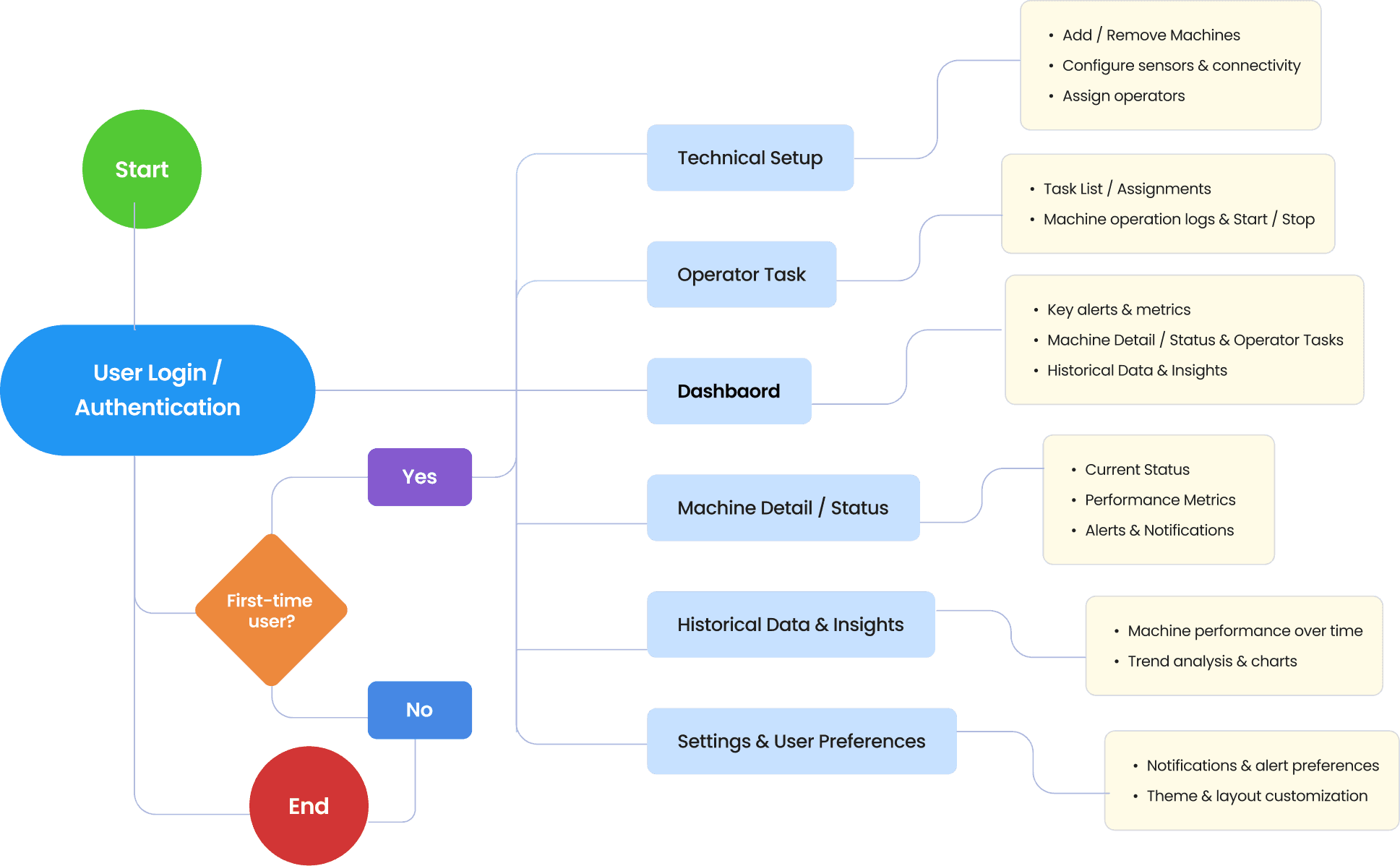
Product Architecture
Product Architecture
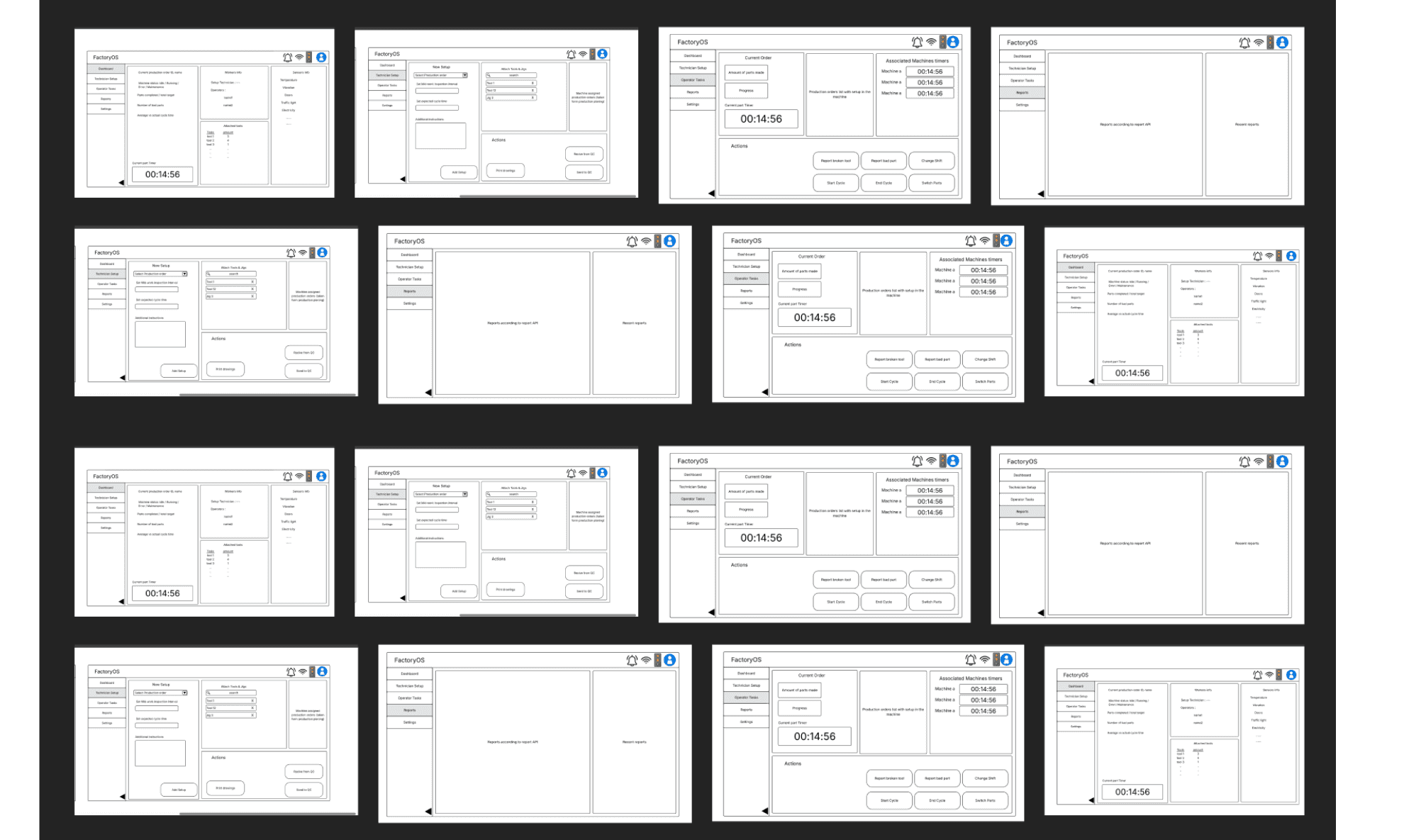
Wireframe
Wireframe
Design System
Design System
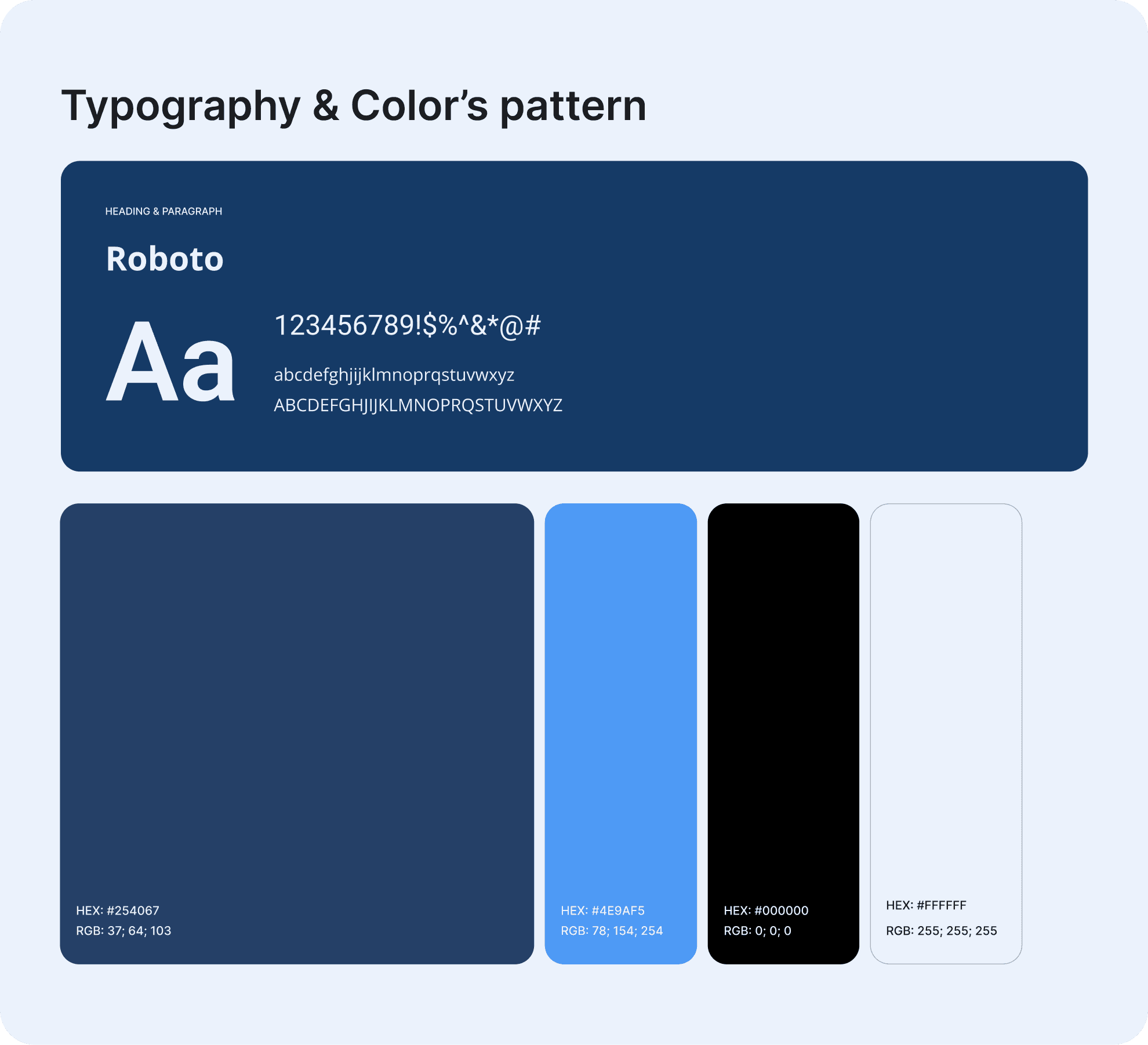
A balanced mix of bold Colours, typography, subtle neutrals, and intuitive iconography ensures data is readable, actionable, and easy to scan in high-pressure factory environments.
A balanced mix of bold Colours, typography, subtle neutrals, and intuitive iconography ensures data is readable, actionable, and easy to scan in high-pressure factory environments.
A balanced mix of bold Colours, typography, subtle neutrals, and intuitive iconography ensures data is readable, actionable, and easy to scan in high-pressure factory environments.
Final Outcome
Final Outcome
The final product delivers a seamless IoT monitoring experience that enables teams to act faster, prevent failures, and maintain continuous production. With clearer insights, reduced downtime, and higher technician efficiency, factories achieved stronger performance and a more predictable, data-driven operation.
The final product delivers a seamless IoT monitoring experience that enables teams to act faster, prevent failures, and maintain continuous production. With clearer insights, reduced downtime, and higher technician efficiency, factories achieved stronger performance and a more predictable, data-driven operation.
The final product delivers a seamless IoT monitoring experience that enables teams to act faster, prevent failures, and maintain continuous production. With clearer insights, reduced downtime, and higher technician efficiency, factories achieved stronger performance and a more predictable, data-driven operation.
Factory OS Real-Time
Production Dashboard
Factory OS Real-Time
Production Dashboard
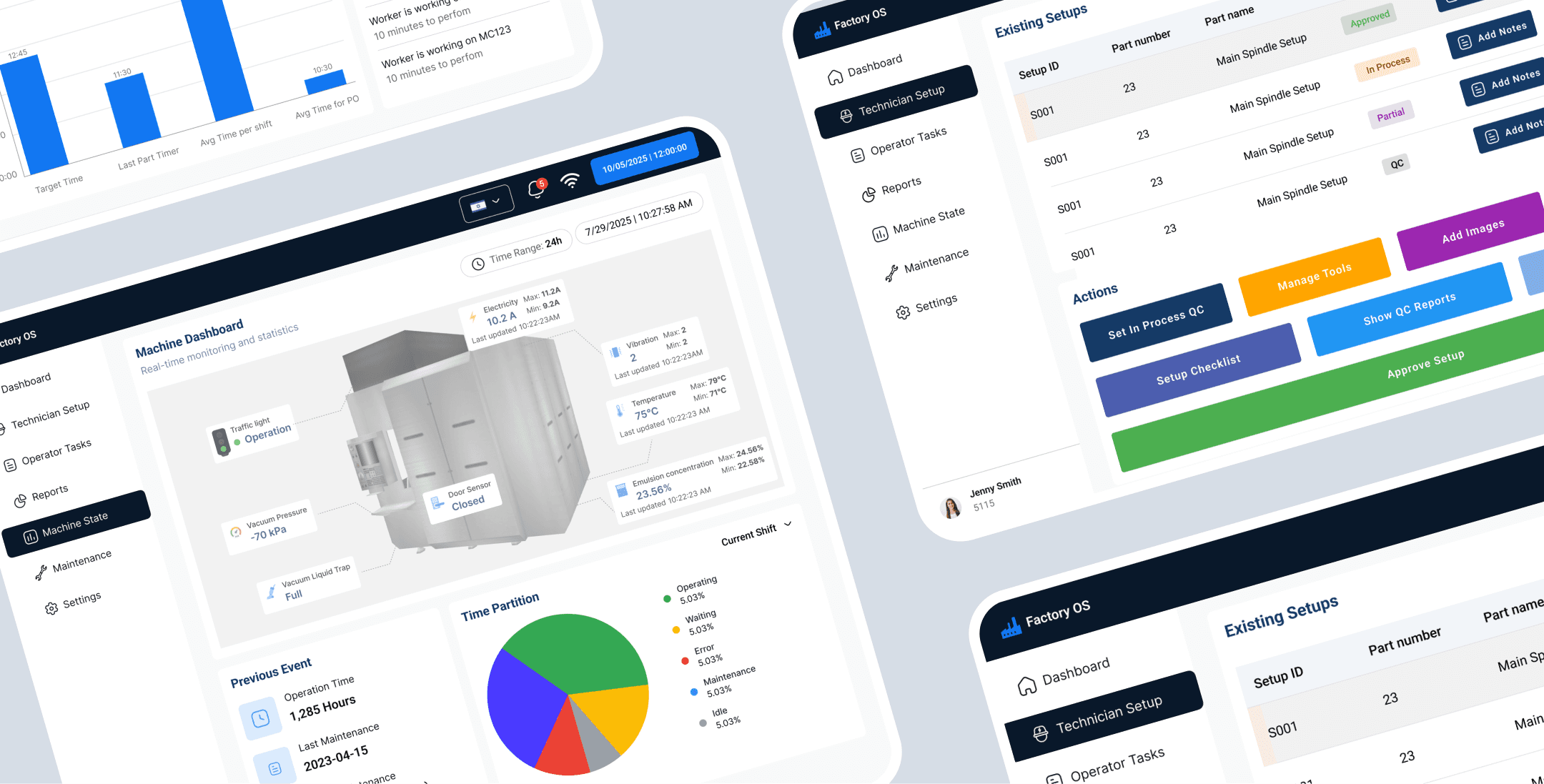
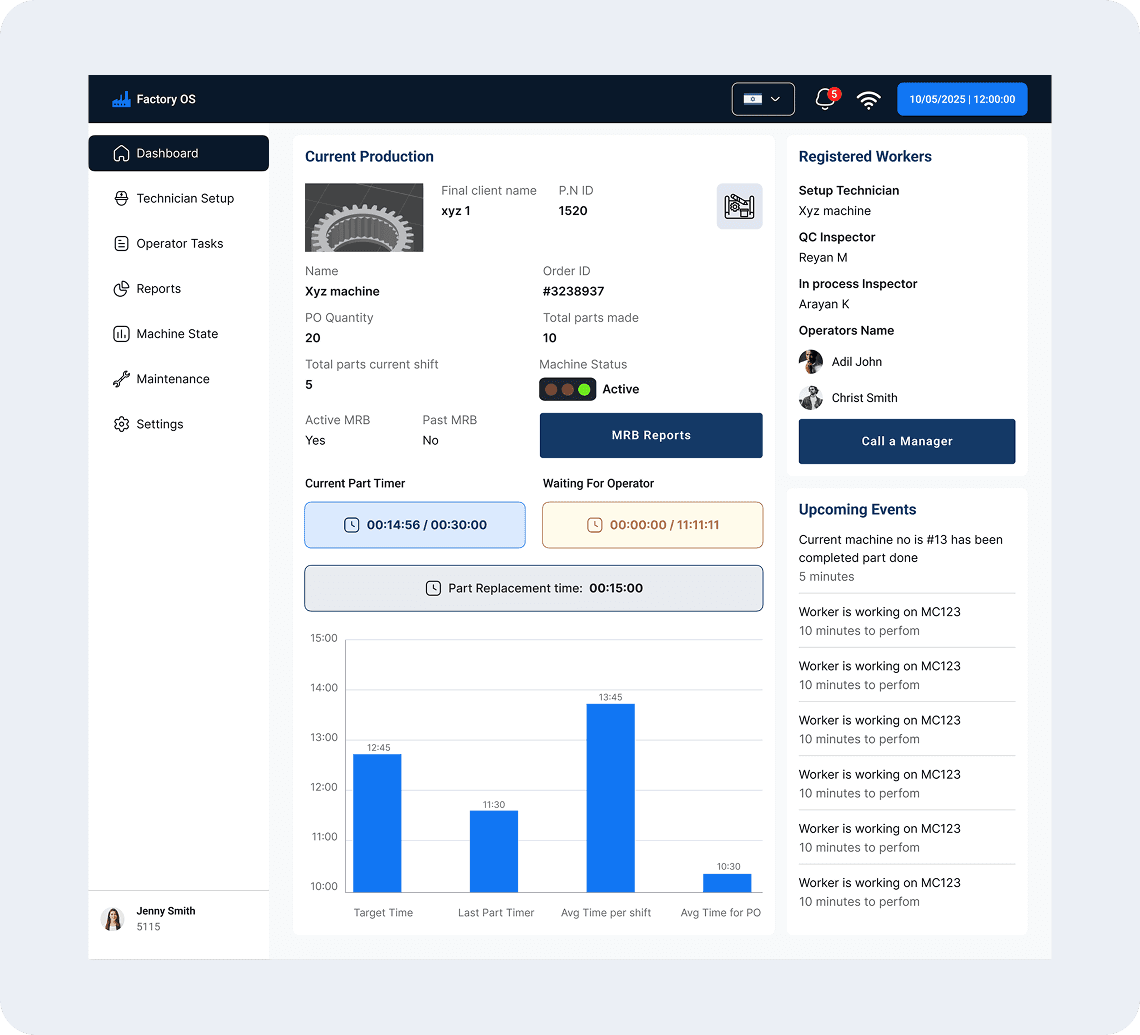
A centralized factory operations interface designed to give teams real-time visibility into production, machine status, worker activity, and upcoming events.
A centralized factory operations interface designed to give teams real-time visibility into production, machine status, worker activity, and upcoming events.
A centralized factory operations interface designed to give teams real-time visibility into production, machine status, worker activity, and upcoming events.
The dashboard brings critical operational data together, helping supervisors monitor performance, manage production tasks, and respond quickly to issues.
The dashboard brings critical operational data together, helping supervisors monitor performance, manage production tasks, and respond quickly to issues.
The dashboard brings critical operational data together, helping supervisors monitor performance, manage production tasks, and respond quickly to issues.
Machine Detail
Machine Detail
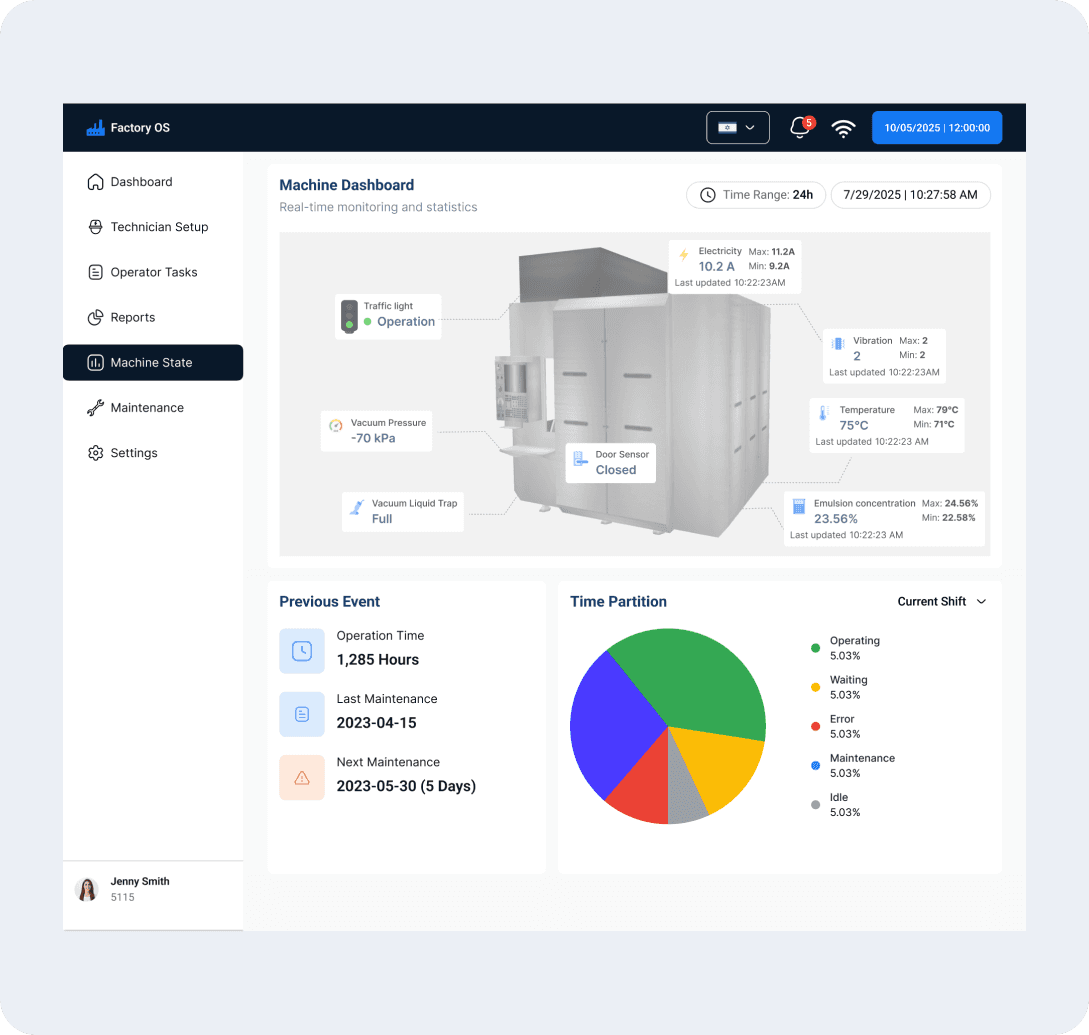
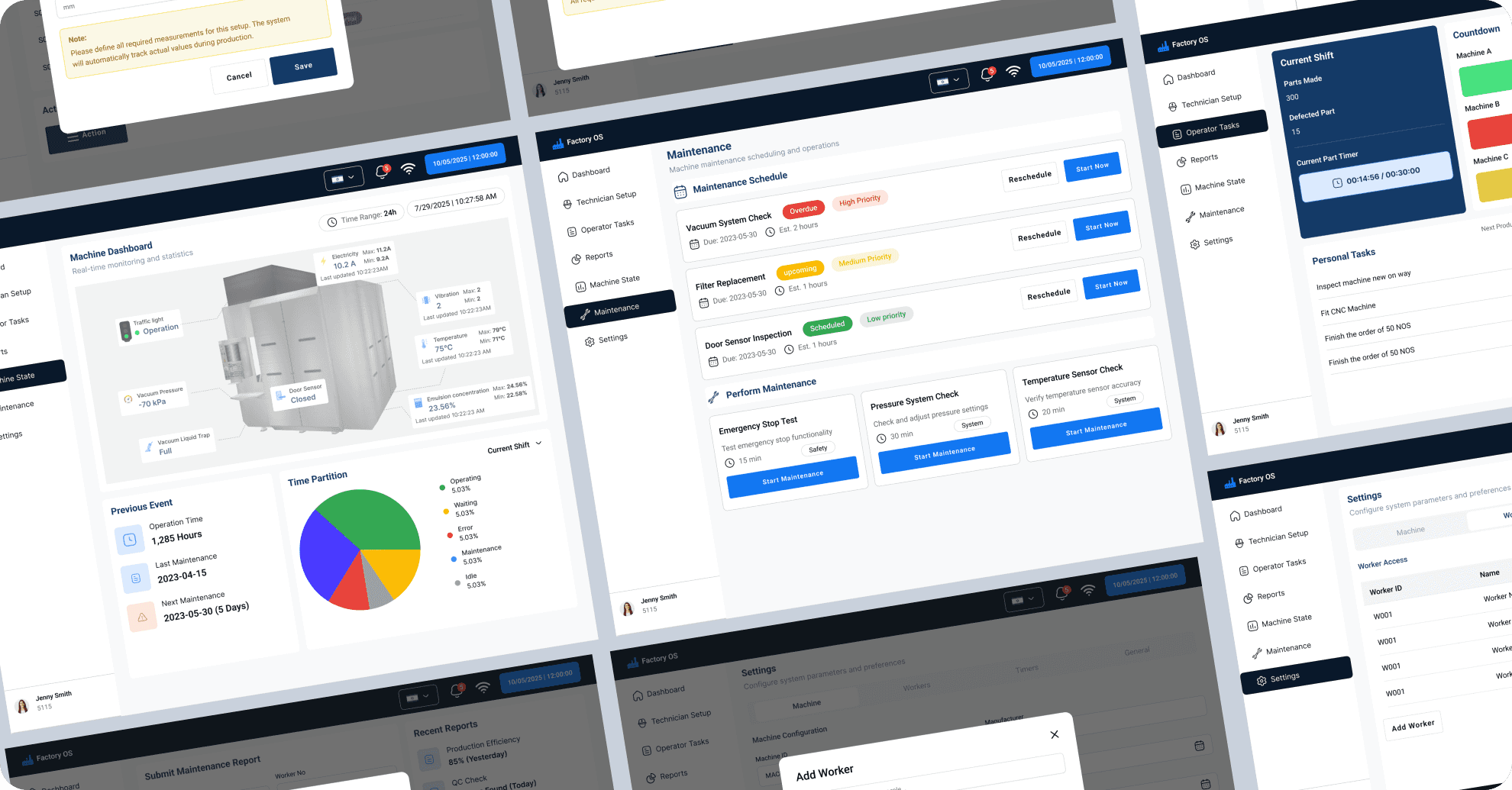
This screen shows real-time machine metrics, historical trends, and predictive behavior in one place. Users can view alerts, maintenance history, and data patterns to understand the root cause of issues.
This screen shows real-time machine metrics, historical trends, and predictive behavior in one place. Users can view alerts, maintenance history, and data patterns to understand the root cause of issues.
This screen shows real-time machine metrics, historical trends, and predictive behavior in one place. Users can view alerts, maintenance history, and data patterns to understand the root cause of issues.
With quick actions like assigning technicians or scheduling maintenance, teams can act immediately without switching screens.
With quick actions like assigning technicians or scheduling maintenance, teams can act immediately without switching screens.
With quick actions like assigning technicians or scheduling maintenance, teams can act immediately without switching screens.
Operator Task
Operator Task
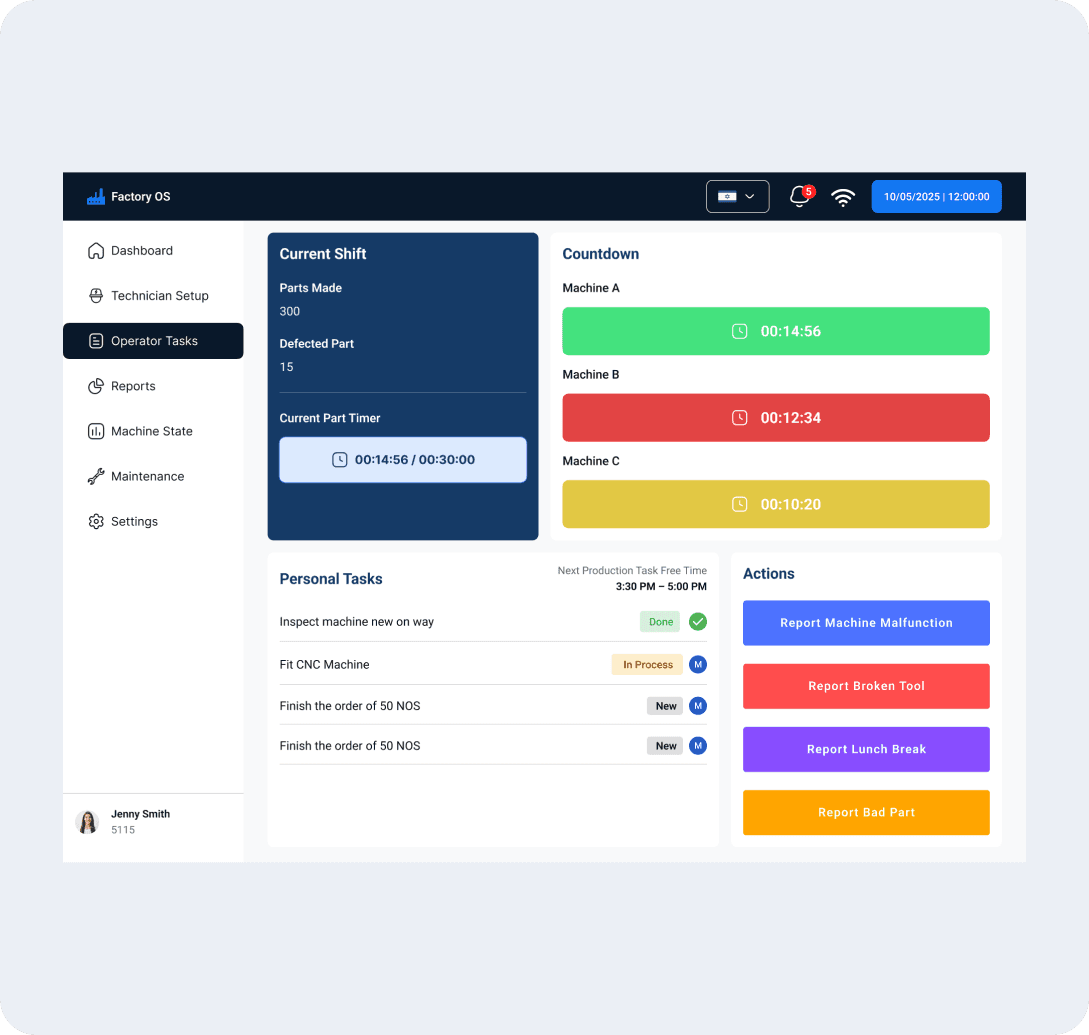
The operator task screen shows a clear list of assigned tasks such as inspections, machine checks, or routine maintenance steps. Each task includes priority, due time, and the machine it belongs to, helping operators stay organized. Simple actions like “Start,” “Mark Complete,” or “Add Notes” keep workflows smooth and trackable. This screen ensures operators always know what to do next and reduces delays on the factory floor.
The operator task screen shows a clear list of assigned tasks such as inspections, machine checks, or routine maintenance steps. Each task includes priority, due time, and the machine it belongs to, helping operators stay organized. Simple actions like “Start,” “Mark Complete,” or “Add Notes” keep workflows smooth and trackable. This screen ensures operators always know what to do next and reduces delays on the factory floor.
The operator task screen shows a clear list of assigned tasks such as inspections, machine checks, or routine maintenance steps. Each task includes priority, due time, and the machine it belongs to, helping operators stay organized. Simple actions like “Start,” “Mark Complete,” or “Add Notes” keep workflows smooth and trackable. This screen ensures operators always know what to do next and reduces delays on the factory floor.

Reports / Analytics
Reports visualize key metrics like performance trends, downtime, and alert frequency across custom time ranges. Predictive risk indicators help managers plan maintenance before failures occur. Users can export insights as PDF/CSV to share with teams and support data-driven decisions.
Reports visualize key metrics like performance trends, downtime, and alert frequency across custom time ranges. Predictive risk indicators help managers plan maintenance before failures occur. Users can export insights as PDF/CSV to share with teams and support data-driven decisions.
Reports visualize key metrics like performance trends, downtime, and alert frequency across custom time ranges. Predictive risk indicators help managers plan maintenance before failures occur. Users can export insights as PDF/CSV to share with teams and support data-driven decisions.
Results & Impact
Results & Impact
Every minute of machine downtime meant revenue loss. Gold-Tech needed a system that improved reaction time, decision-making, and task transparency.
Every minute of machine downtime meant revenue loss. Gold-Tech needed a system that improved reaction time, decision-making, and task transparency.
Every minute of machine downtime meant revenue loss. Gold-Tech needed a system that improved reaction time, decision-making, and task transparency.
Faster Decision-Making
Clear KPIs and machine insights help operators understand factory performance at a glance.
Clear KPIs and machine insights help operators understand factory performance at a glance.
Faster Decision-Making
Configurable alerts make abnormal machine and sensor conditions easier to detect.
Configurable alerts make abnormal machine and sensor conditions easier to detect.
Better Operational Visibility
Production, machine, workforce, and quality data are brought together in one system.
Production, machine, workforce, and quality data are brought together in one system.
Streamlined Workflows
Planning, monitoring, device management, and reporting are connected across the factory.
Planning, monitoring, device management, and reporting are connected across the factory.