Stork – Designing a Better Wholesale Experience for Buyers & Sellers
Stork – Designing a Better Wholesale Experience for Buyers & Sellers
Stork – Designing a Better Wholesale Experience for Buyers & Sellers
Service
B2B SasS Platform
B2B SasS Platform
Client
Stork App Inc
Stork App Inc
What I Do
Web & Mobile Platform Design
Web & Mobile Platform Design
01 UI/UX Design
02 Sass Design
03 Figma
04 Jewellery e Commerce Platform
05 Design System
01 UI/UX Design
02 Sass Design
03 Figma
04 Jewellery e Commerce Platform
05 Design System
About this project
About this project
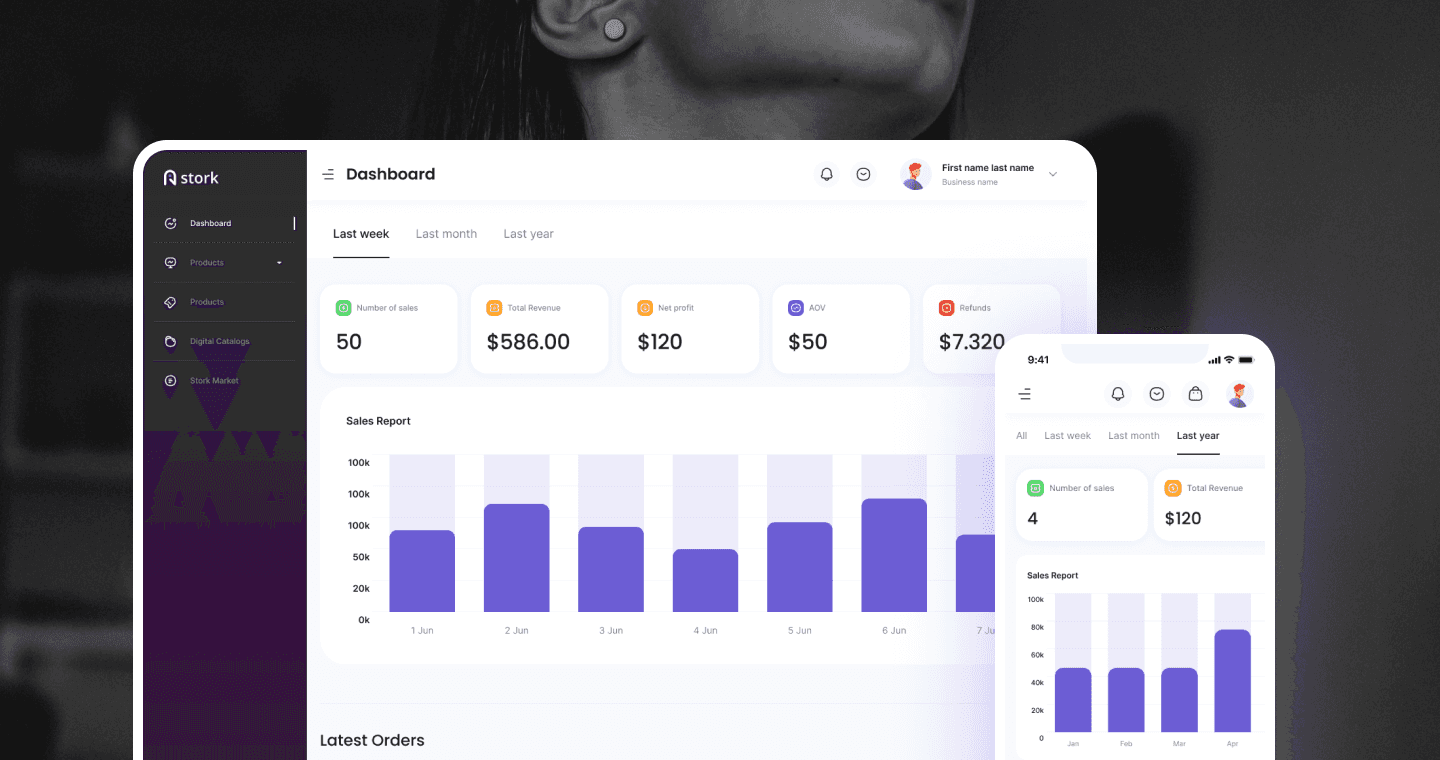
Stork is a B2B wholesale marketplace platform designed to streamline bulk product ordering, store management, and inventory coordination between buyers and sellers. My goal was to create a clean, efficient, and intuitive experience while managing complex inventory, ordering, and buyer/seller coordination.
Stork is a B2B wholesale marketplace platform designed to streamline bulk product ordering, store management, and inventory coordination between buyers and sellers. My goal was to create a clean, efficient, and intuitive experience while managing complex inventory, ordering, and buyer/seller coordination.
Stork is a B2B wholesale marketplace platform designed to streamline bulk product ordering, store management, and inventory coordination between buyers and sellers. My goal was to create a clean, efficient, and intuitive experience while managing complex inventory, ordering, and buyer/seller coordination.
Problem
Wholesale buyers struggled with: difficulty finding sellers, slow/fragmented ordering process, unclear return policies. Sellers struggled with: no visibility into performance, inconsistent product management, and poor order tracking.
Wholesale buyers struggled with: difficulty finding sellers, slow/fragmented ordering process, unclear return policies. Sellers struggled with: no visibility into performance, inconsistent product management, and poor order tracking.
Solution
Stork simplifies B2B commerce with a seamless digital platform that connects buyers and suppliers in real time. It enhances efficiency through automated inventory management, recommendations, and sustainable growth solutions.
Stork simplifies B2B commerce with a seamless digital platform that connects buyers and suppliers in real time. It enhances efficiency through automated inventory management, recommendations, and sustainable growth solutions.
Impact
A platform that fosters efficiency, trust, and data-driven decision-making, Stork enables businesses to scale effortlessly in a competitive marketplace.
Team
Client
Me as designer
My role
Solo UX/UI Designer
Solo UX/UI Designer
Timeline
6 month
Tools
Figma, FigJam, Notion
Challenge
Challenge
Wholesale shoppers struggled with: difficulty finding trusted sellers, slow/fragmented ordering process, unclear return and dispute policies, inconsistent product listings across sellers.
Wholesale shoppers struggled with: difficulty finding trusted sellers, slow/fragmented ordering process, unclear return and dispute policies, inconsistent product listings across sellers.
Difficulty finding relevant products
Slow, fragmented ordering process
Unclear stock visibility
Difficulty finding relevant products
Slow, fragmented ordering process
Unclear stock visibility
Sellers faced:
Sellers faced:
No clear analytics for performance
Complicated product management
Poor visibility of order lifecycle
No clear analytics for performance
Complicated product management
Poor visibility of order lifecycle
Product Goal
Product Goal
Create a modern SaaS platform to increase order volume, reduce seller onboarding time, and introduce analytics that drive better decision-making.
Create a modern SaaS platform to increase order volume, reduce seller onboarding time, and introduce analytics that drive better decision-making.
Build a streamlined, easy-to-use wholesale dashboard
Improve discoverability of products
Provide powerful analytics for sellers
Reduce friction in the ordering and stock-management flows
Establish a clean, premium visual identity for the brand
Build a streamlined, easy-to-use wholesale dashboard
Improve discoverability of products
Provide powerful analytics for sellers
Reduce friction in the ordering and stock-management flows
Establish a clean, premium visual identity for the brand

Process
Process
Research & Strategy
User Interviews & Competitor Analysis
User Persona & Empathy Mapping
Information Architecture
Design
Wireframes
Branding & Design System
Visual Design
Delivery Execution
High-Fidelity Prototypes
Testing
Finalization
Understand the realities
Understand the realities
I spent the first on research interviewing buyers and sellers, mapping current workflows, and auditing competitor B2B platforms. The key finding: both user types needed completely different information and tasks, but the platform was trying to serve them with the same interface.
I spent the first on research interviewing buyers and sellers, mapping current workflows, and auditing competitor B2B platforms. The key finding: both user types needed completely different information and tasks, but the platform was trying to serve them with the same interface.
I spent the first on research interviewing buyers and sellers, mapping current workflows, and auditing competitor B2B platforms. The key finding: both user types needed completely different information and tasks, but the platform was trying to serve them with the same interface.
I designed two distinct experience streams:
one optimised for buyers (fast discovery → clear pricing → quick checkout) and one optimised for sellers (easy listing management → clear order pipeline → actionable analytics).
I designed two distinct experience streams:
one optimised for buyers (fast discovery → clear pricing → quick checkout) and one optimised for sellers (easy listing management → clear order pipeline → actionable analytics).
I designed two distinct experience streams:
one optimised for buyers (fast discovery → clear pricing → quick checkout) and one optimised for sellers (easy listing management → clear order pipeline → actionable analytics).
Research & Insights
Research & Insights
Buyer
Buyer
Needs fast product discovery
Prefers clear pricing and bulk deals
Slow ordering, missing product details
Needs fast product discovery
Prefers clear pricing and bulk deals
Slow ordering, missing product details
Seller
Seller
Needs an organized inventory system
Wants to track revenue and analytics
Too many steps to update stock
Key Research Insights
Key Research Insights
Buyers depend heavily on filters and quick views
Sellers need real-time performance insights
Mobile usage among buyers was higher than expected
Sellers needed multi-product upload support
Key Design Decisions
Key Design Decisions
Problem
Problem
Buyers and sellers had fundamentally different pain points — buyers needed faster discovery and comparison, sellers needed inventory visibility and predictable order flow.
Buyers and sellers had fundamentally different pain points — buyers needed faster discovery and comparison, sellers needed inventory visibility and predictable order flow.
Considered
Considered
One generalized flow serving both user types vs. two distinct flows built around each persona's specific needs.
One generalized flow serving both user types vs. two distinct flows built around each persona's specific needs.
Chose
Chose
Separate buyer and seller flows sharing a unified design system — buyer flow optimized for discovery, comparison, and ordering; seller flow optimized for inventory, order management, and fulfillment.
Separate buyer and seller flows sharing a unified design system — buyer flow optimized for discovery, comparison, and ordering; seller flow optimized for inventory, order management, and fulfillment.
Why?
Why?
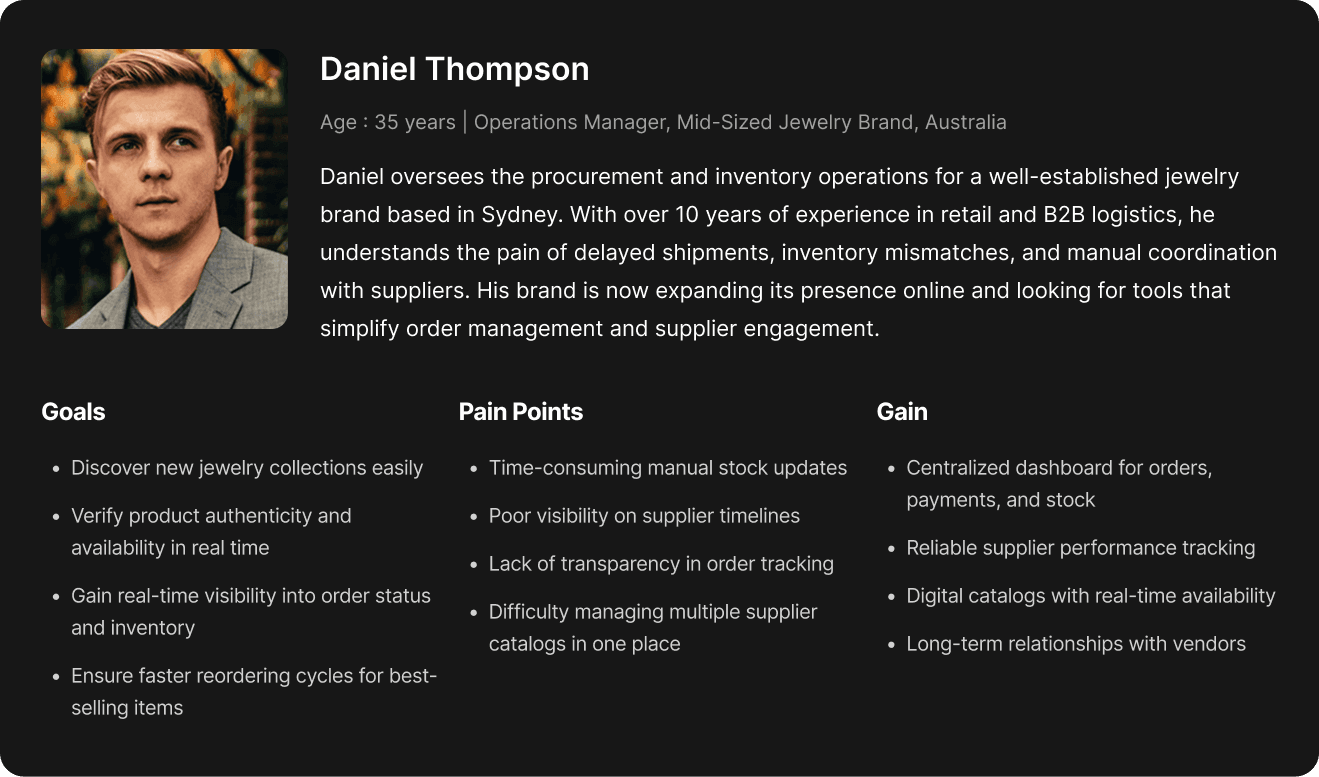
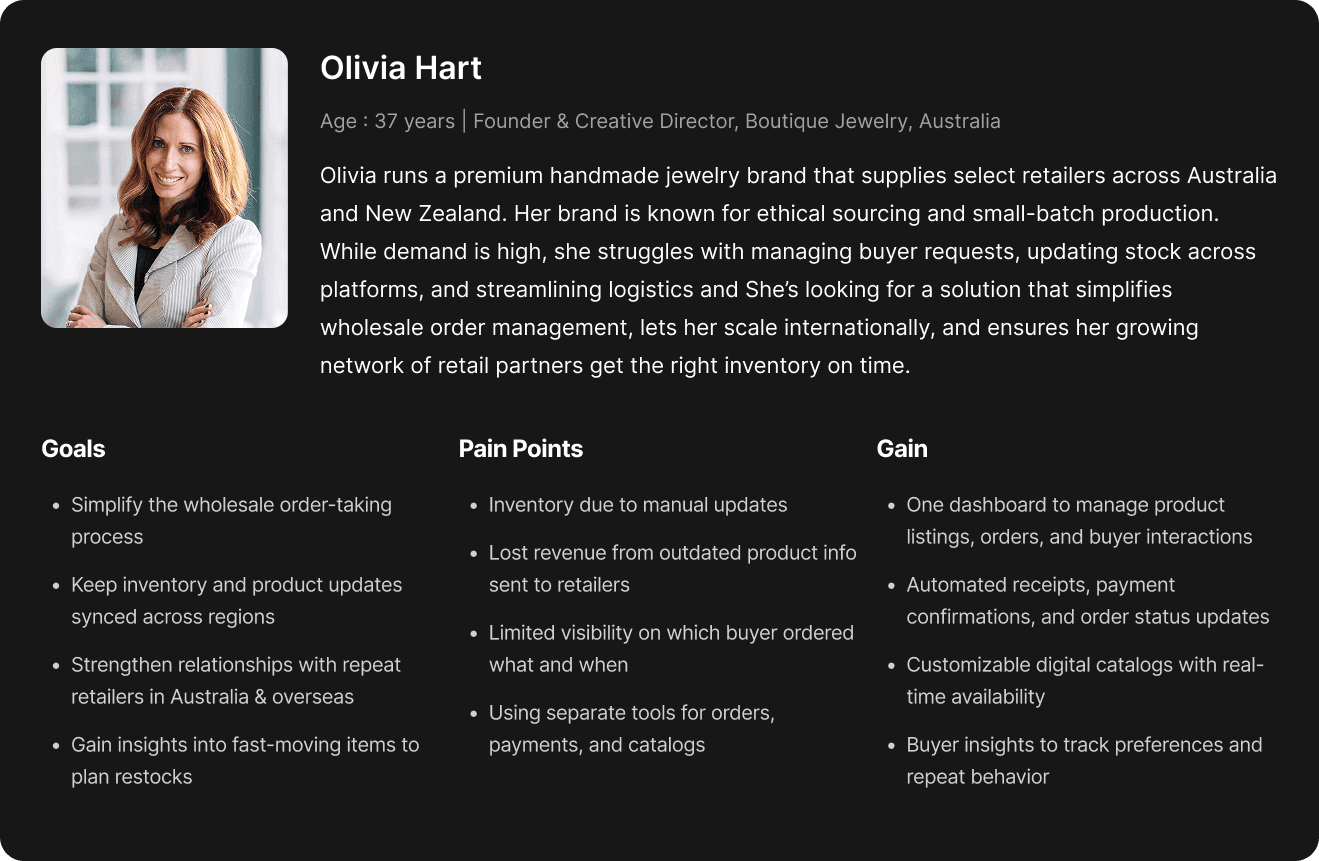
Olivia's top frustration was slow product discovery and comparison; Daniel's top frustration was inventory and demand visibility. A single shared flow would have under-served whichever side wasn't prioritized in any given screen.
Olivia's top frustration was slow product discovery and comparison; Daniel's top frustration was inventory and demand visibility. A single shared flow would have under-served whichever side wasn't prioritized in any given screen.
Design Points
Design Points
Buyer: filtered product discovery
Buyer: filtered product discovery
I designed a smart filter system with category, price range, and availability as the primary controls. Buyers can now shortlist, compare, and favourite products without leaving the catalogue cutting product selection time significantly.
I designed a smart filter system with category, price range, and availability as the primary controls. Buyers can now shortlist, compare, and favourite products without leaving the catalogue cutting product selection time significantly.
Buyer: streamlined checkout
Buyer: streamlined checkout
I reduced the checkout flow from 7 steps to 3. Pricing, quantity, and shipping are visible before the buyer commits. The result: 28% faster checkout completion.
I reduced the checkout flow from 7 steps to 3. Pricing, quantity, and shipping are visible before the buyer commits. The result: 28% faster checkout completion.
Seller: centralized order management
Seller: centralized order management
I designed a single order management screen where sellers can see all incoming buyer requests, approve or reject orders, and generate invoices without switching screens. This eliminated the biggest source of seller errors.
I designed a single order management screen where sellers can see all incoming buyer requests, approve or reject orders, and generate invoices without switching screens. This eliminated the biggest source of seller errors.
Seller: digital catalogue management
Seller: digital catalogue management
Sellers can now create, edit, and update product listings with real-time previews. Multi-product upload support was a specific research-driven request to sellers were losing hours to one-by-one uploads.
Sellers can now create, edit, and update product listings with real-time previews. Multi-product upload support was a specific research-driven request to sellers were losing hours to one-by-one uploads.
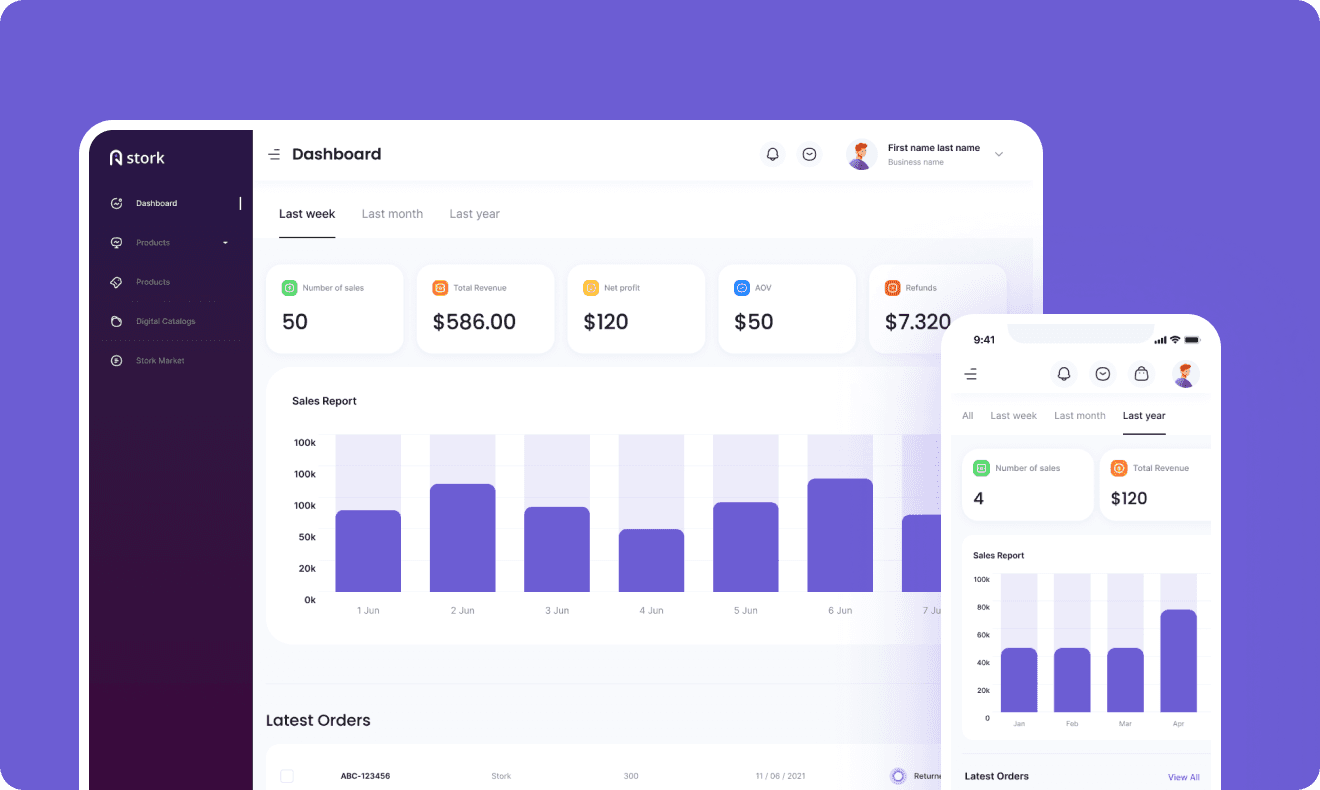
Seller: analytics dashboard
Seller: analytics dashboard
I designed a performance dashboard showing revenue trends, top products, buyer engagement, and inventory health. Sellers went from flying blind to making data-driven decisions.
I designed a performance dashboard showing revenue trends, top products, buyer engagement, and inventory health. Sellers went from flying blind to making data-driven decisions.
User Persona
User Persona
User Persona
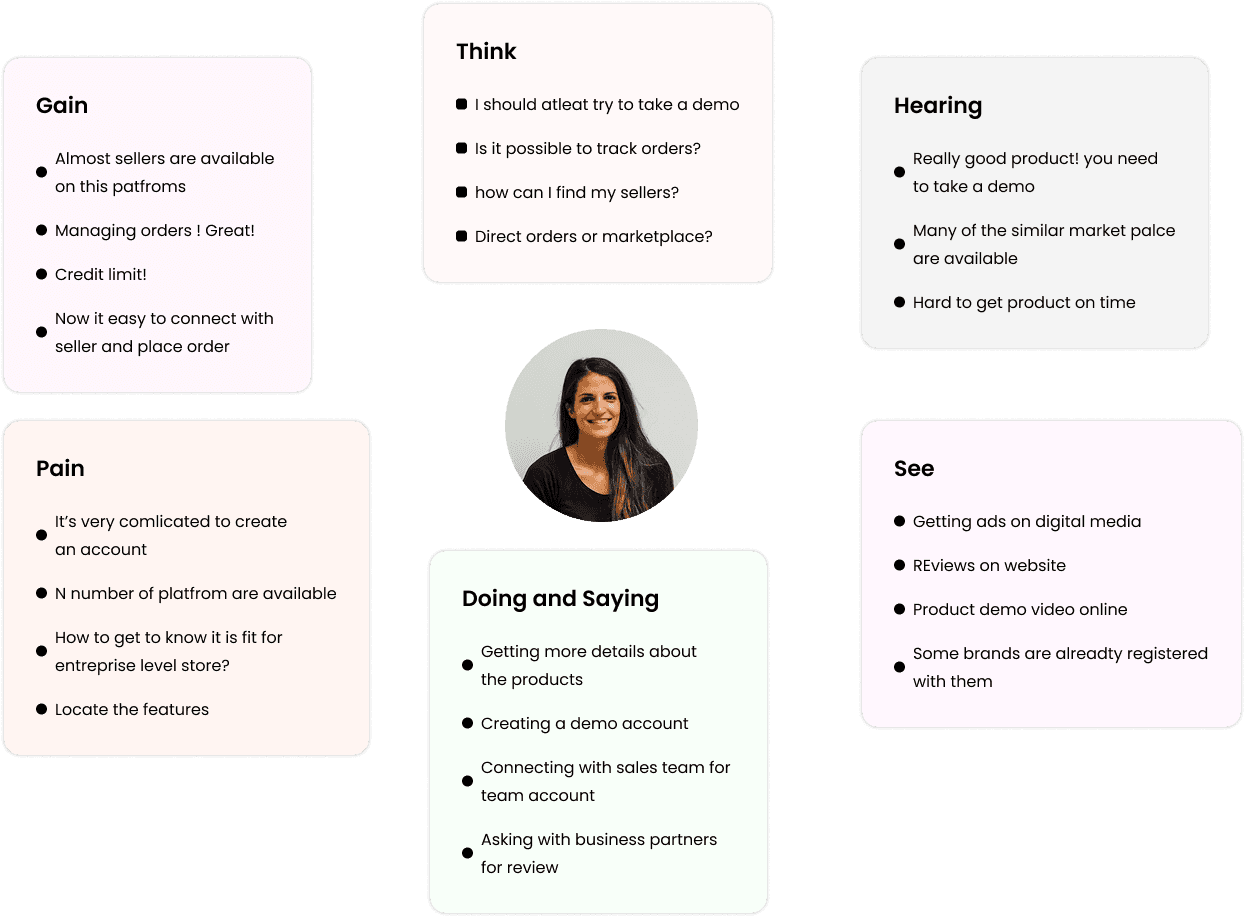
Empathy Map
Empathy Map
Buyer's Empathy Map
Buyer's Empathy Map
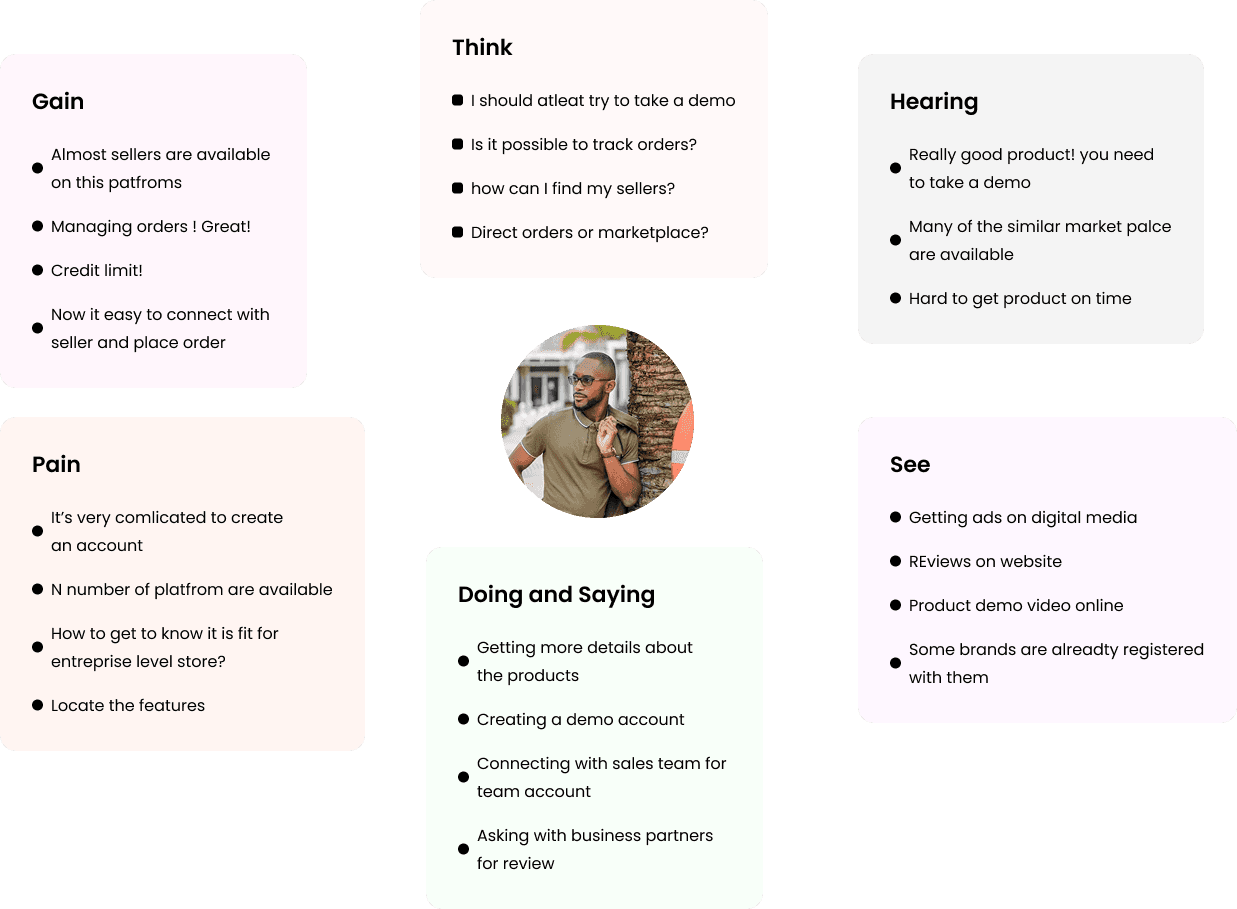
Seller's Empathy Map
Seller's Empathy Map
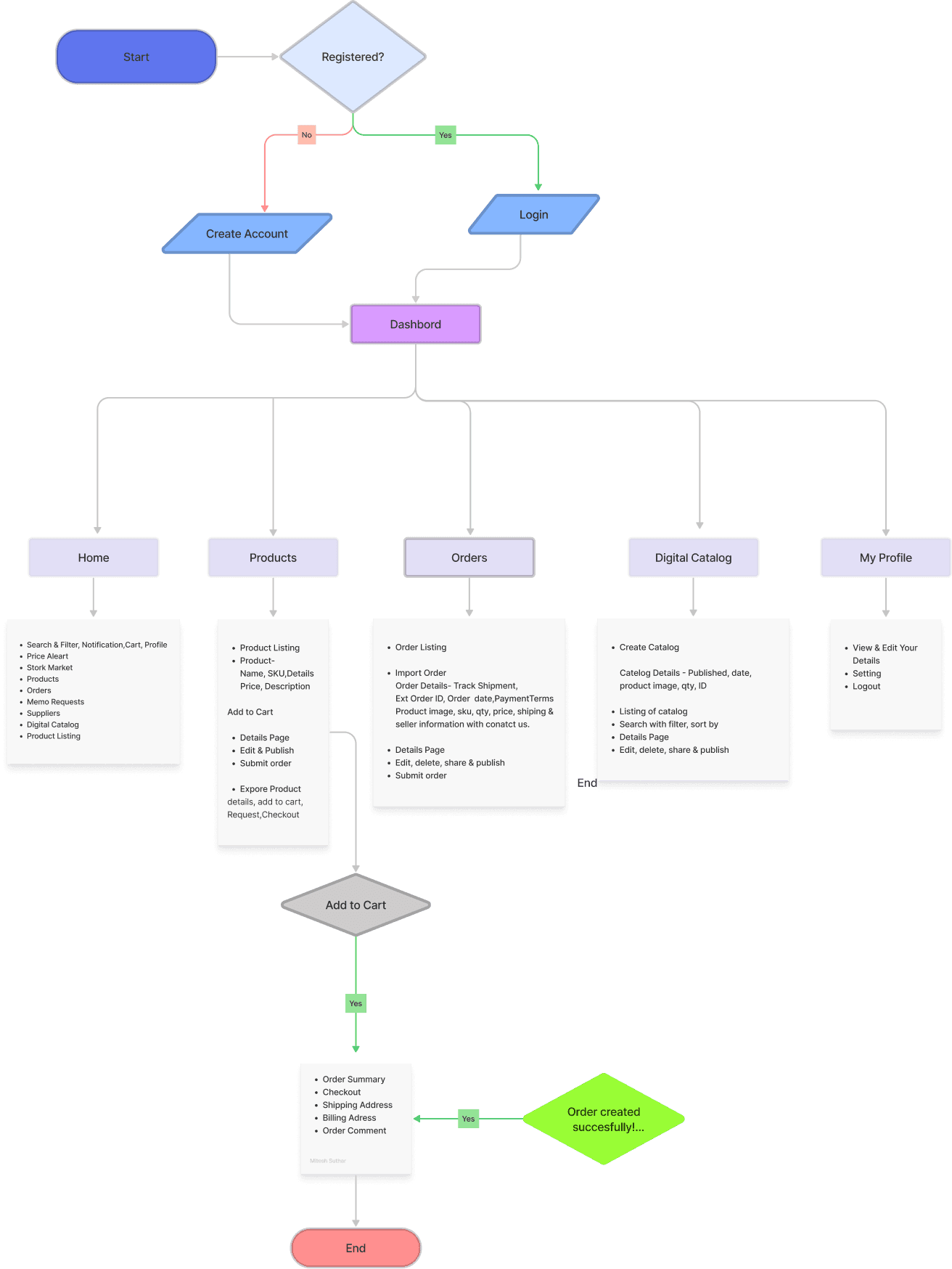
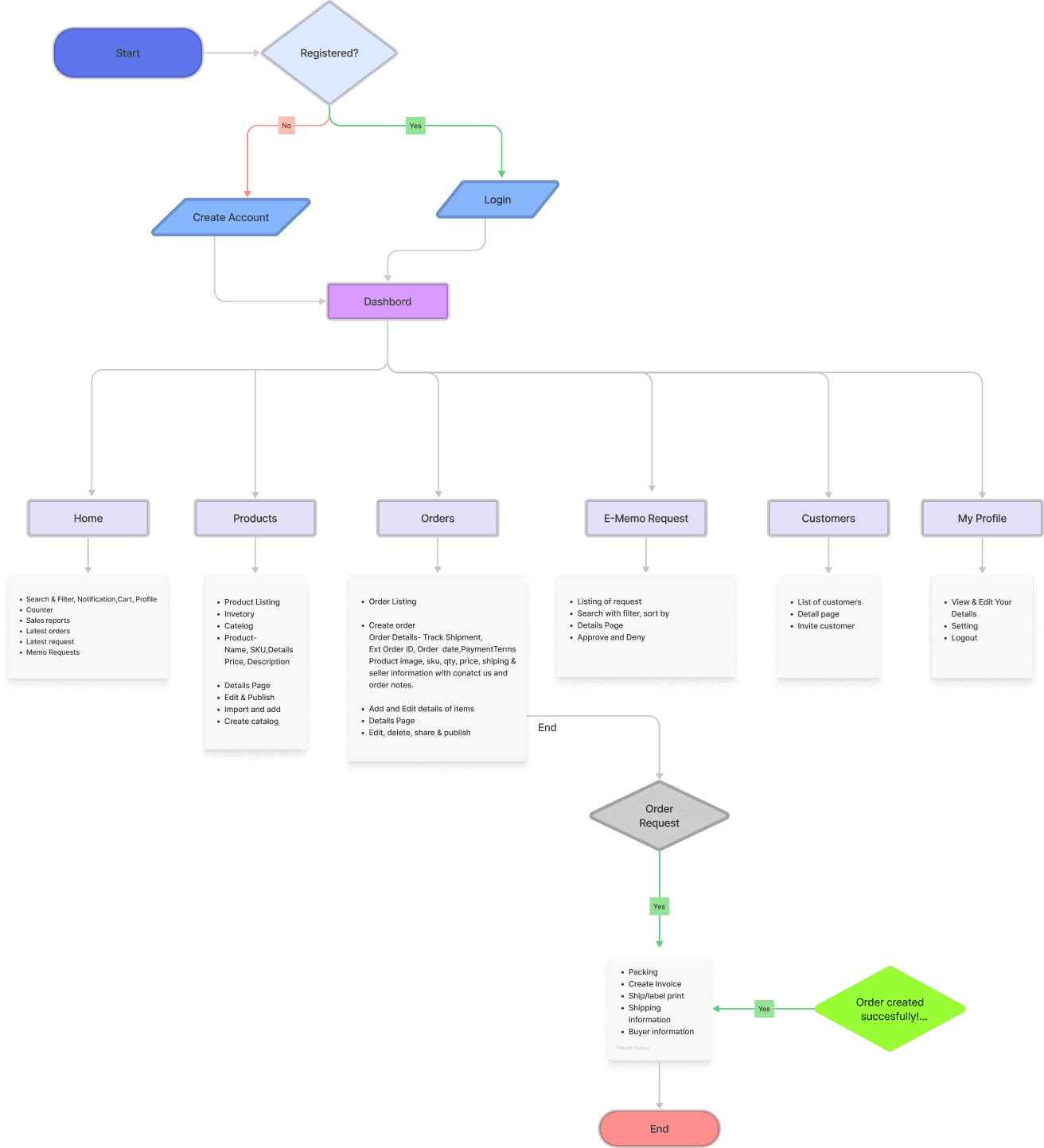
User Flows
User Flows
Buyer's Flow
Seller's Flow
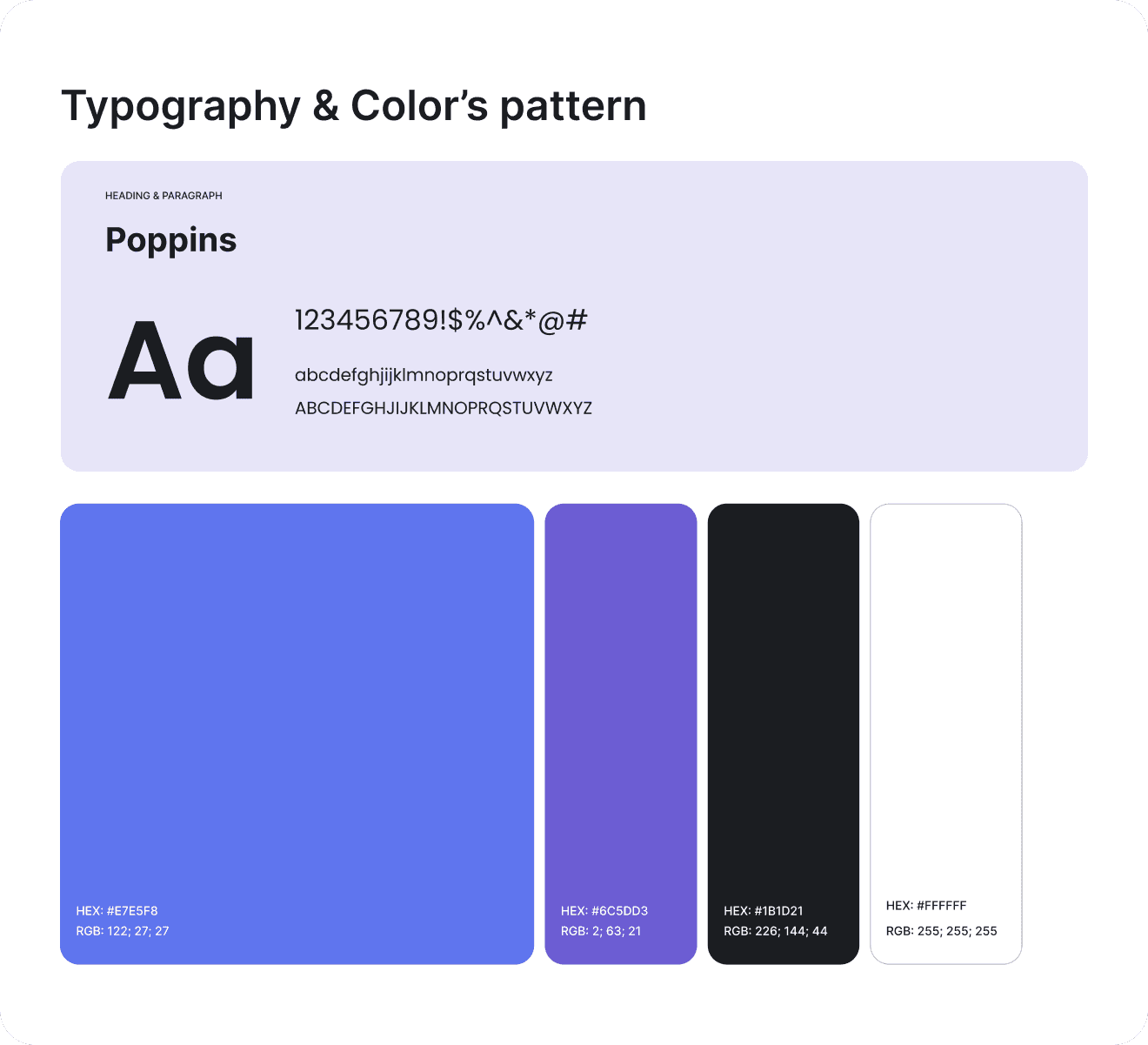
Design System
Design System
A design system built for two distinct user types sharing one visual language — clean data-dense layouts for sellers managing orders, and card-based discovery layouts for buyers browsing catalogues.
A design system built for two distinct user types sharing one visual language — clean data-dense layouts for sellers managing orders, and card-based discovery layouts for buyers browsing catalogues.
A design system built for two distinct user types sharing one visual language — clean data-dense layouts for sellers managing orders, and card-based discovery layouts for buyers browsing catalogues.


Final Solutions
Final Solutions
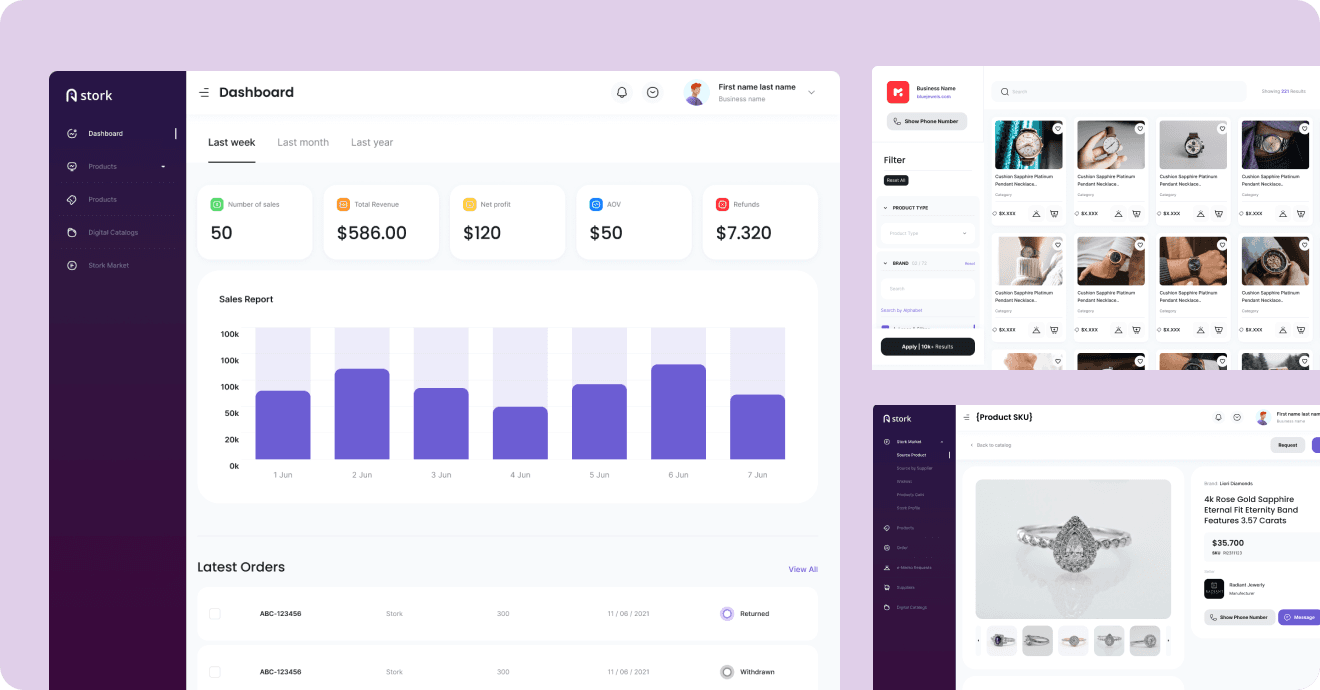
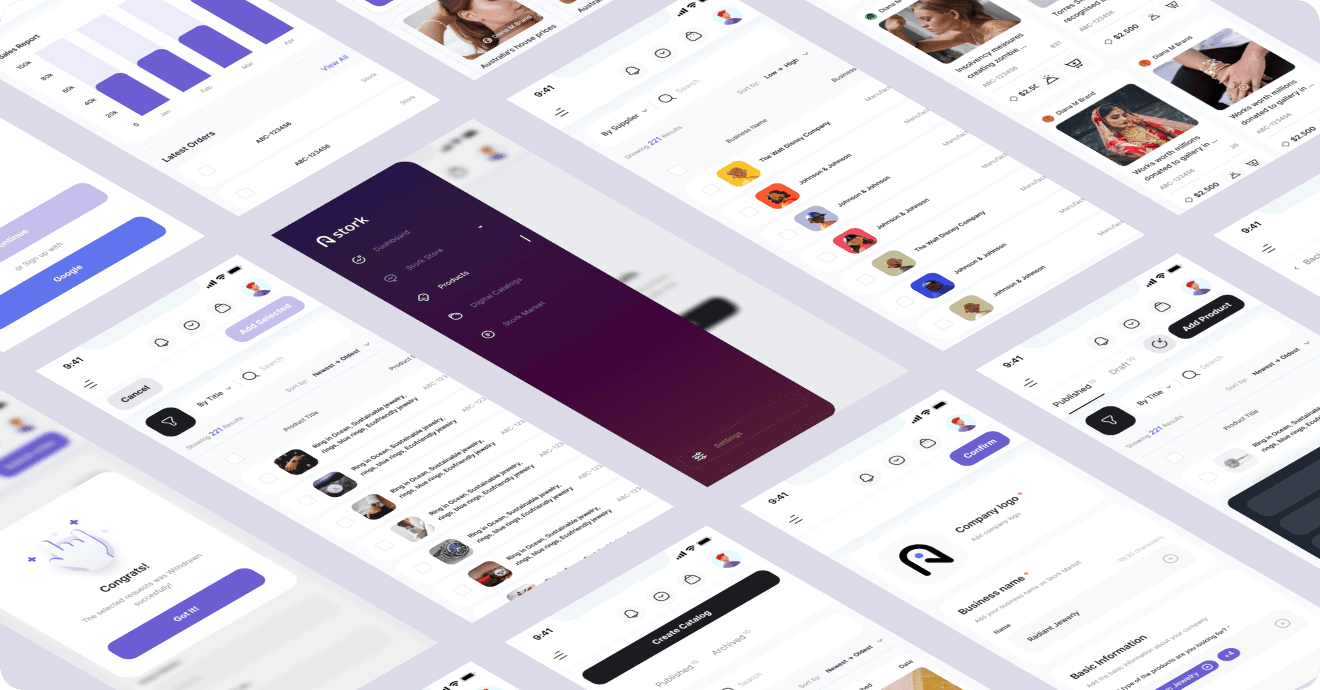
Stork’s design is crafted to captivate and streamline the B2B experience. Through a balance of clean layouts, intuitive navigation, and modern typography, every visual element enhances usability and engagement. High-quality imagery and a structured interface ensure clarity, making transactions and collaborations seamless and efficient.
Stork’s design is crafted to captivate and streamline the B2B experience. Through a balance of clean layouts, intuitive navigation, and modern typography, every visual element enhances usability and engagement. High-quality imagery and a structured interface ensure clarity, making transactions and collaborations seamless and efficient.
Stork’s design is crafted to captivate and streamline the B2B experience. Through a balance of clean layouts, intuitive navigation, and modern typography, every visual element enhances usability and engagement. High-quality imagery and a structured interface ensure clarity, making transactions and collaborations seamless and efficient.
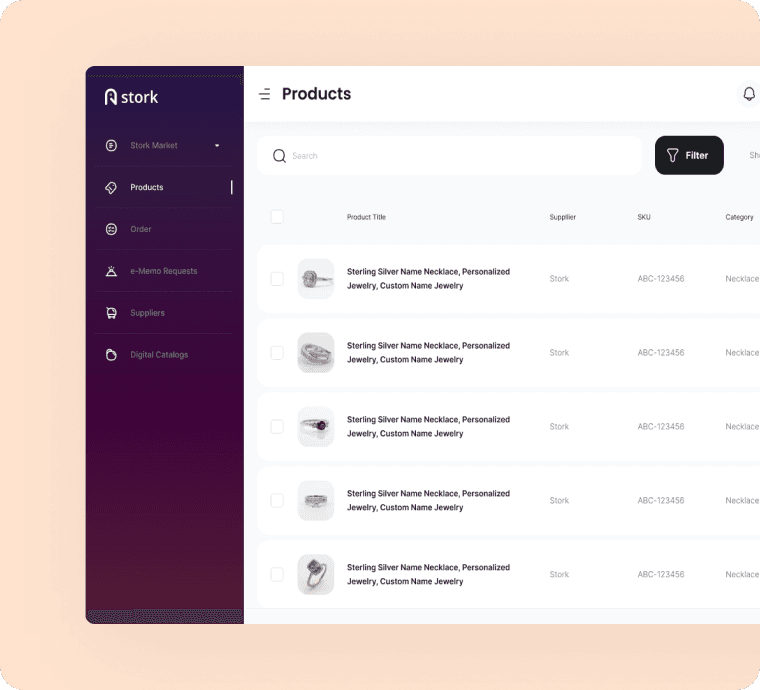
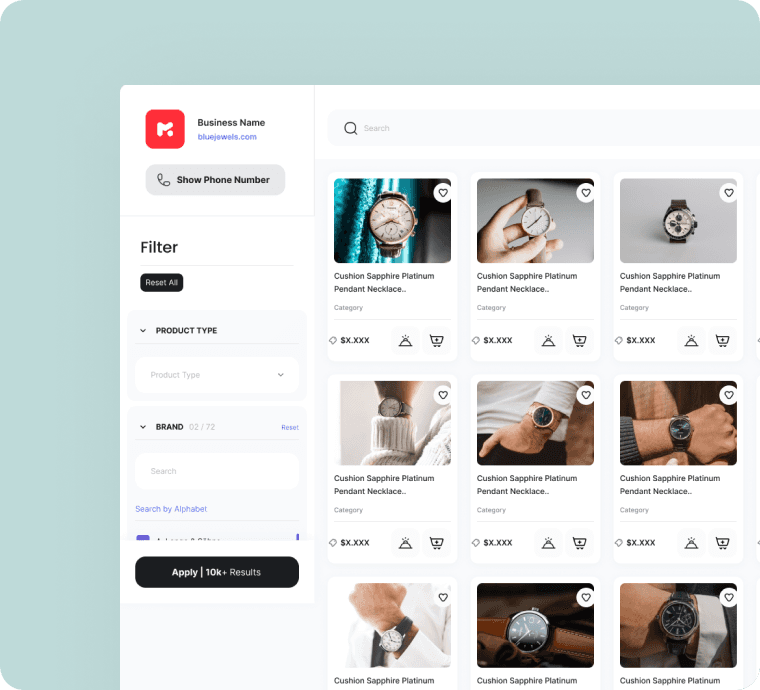
Products List
Products List
Buyers can easily compare, filter, and favorite products in a visually organized layout.
Buyers can easily compare, filter, and favorite products in a visually organized layout.
Buyers can easily compare, filter, and favorite products in a visually organized layout.
User Problem:
Buyers are browsing product options and saving favorites.
User Problem:
Buyers are browsing product options and saving favorites.
Problem it solves:
Previously, buyers had to manually request catalogs or sift through spreadsheets.
Problem it solves:
Previously, buyers had to manually request catalogs or sift through spreadsheets.
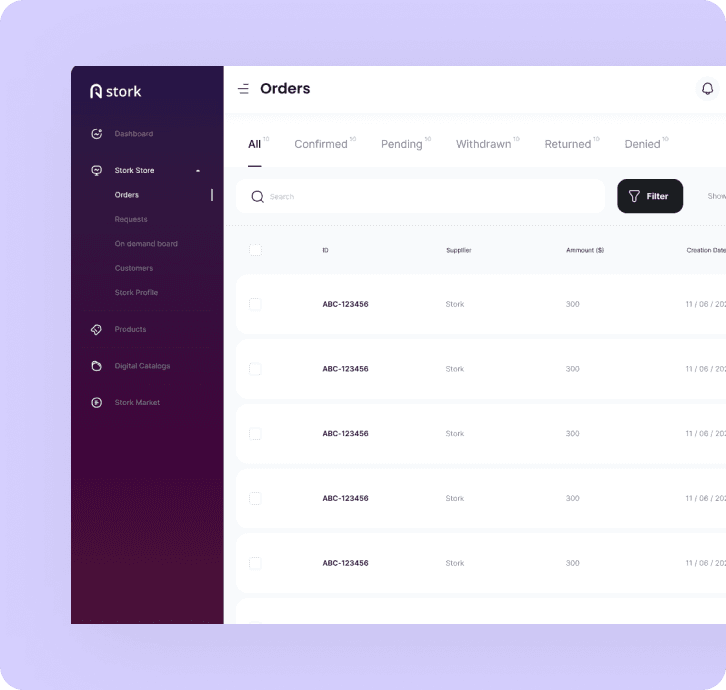
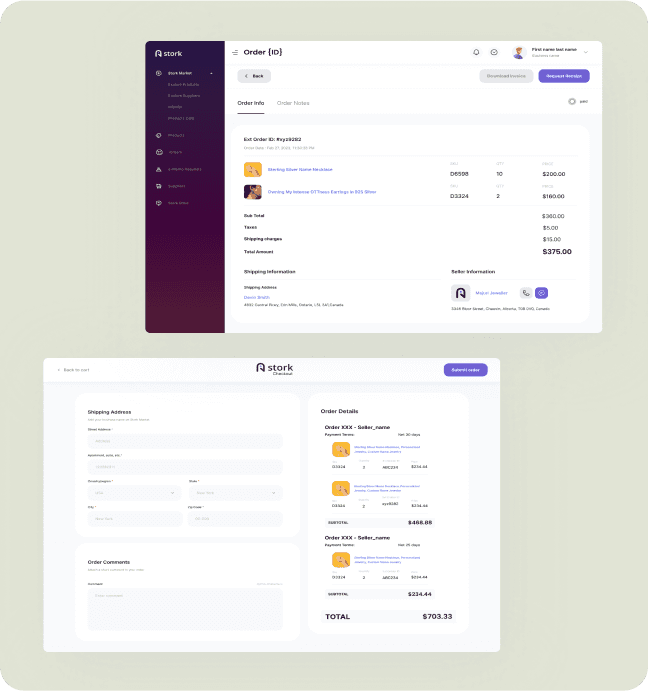
Order Management Screen
Order Management Screen
Sellers receive buyer requests and can instantly approve, reject, or modify orders.
Sellers receive buyer requests and can instantly approve, reject, or modify orders.
Sellers receive buyer requests and can instantly approve, reject, or modify orders.
User Problem:
Sellers receive and manage orders from multiple buyers.
User Problem:
Sellers receive and manage orders from multiple buyers.
Problem it solves:
A clear, centralized view of all orders streamlines processing and reduces errors.
Problem it solves:
A clear, centralized view of all orders streamlines processing and reduces errors.
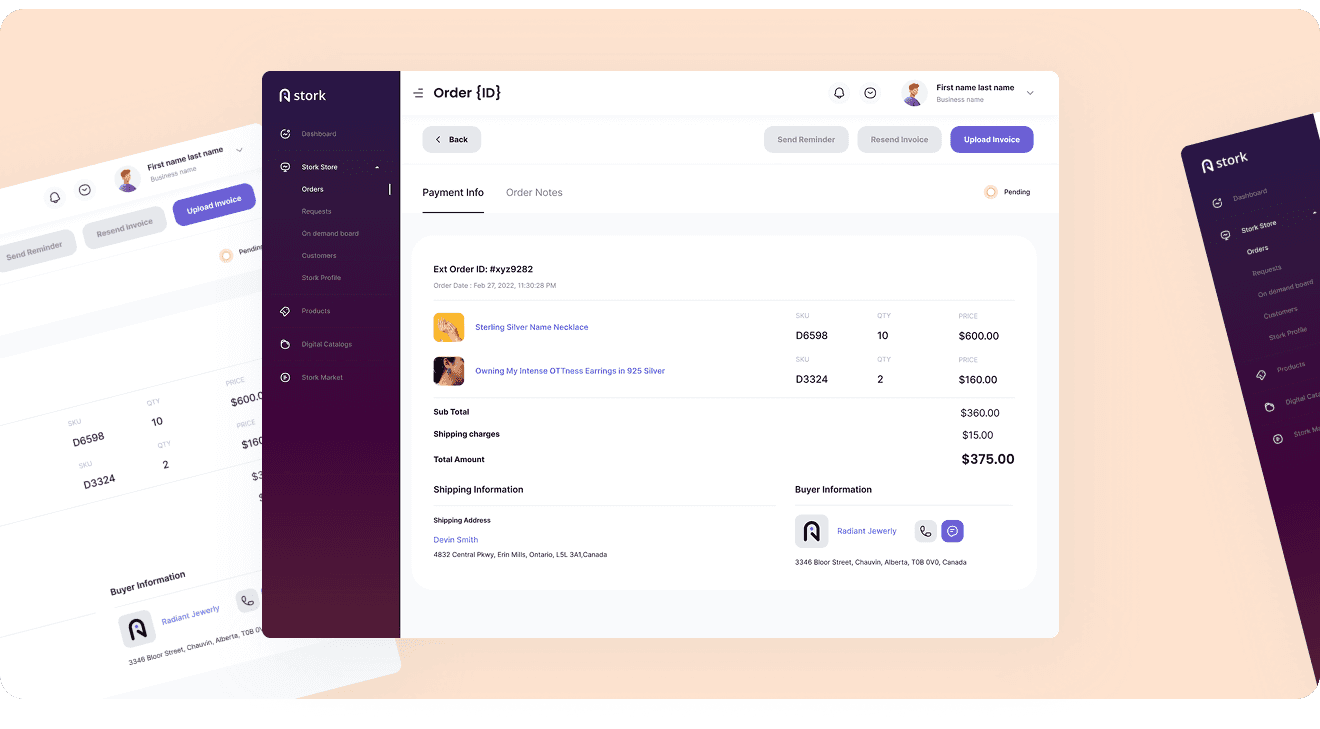
Payment & Invoicing
Payment & Invoicing
Streamlined payment flow with real-time receipt generation and order confirmation.
Streamlined payment flow with real-time receipt generation and order confirmation.
Streamlined payment flow with real-time receipt generation and order confirmation.
User Problem:
Sellers prepare invoices and share payment receipts with buyers and Manual payment handling led to tracking issues and delayed processing.
User Problem:
Sellers prepare invoices and share payment receipts with buyers and Manual payment handling led to tracking issues and delayed processing.
Problem it solves:
Automated payment tracking ensures transparency and faster transaction cycles..
Problem it solves:
Automated payment tracking ensures transparency and faster transaction cycles..
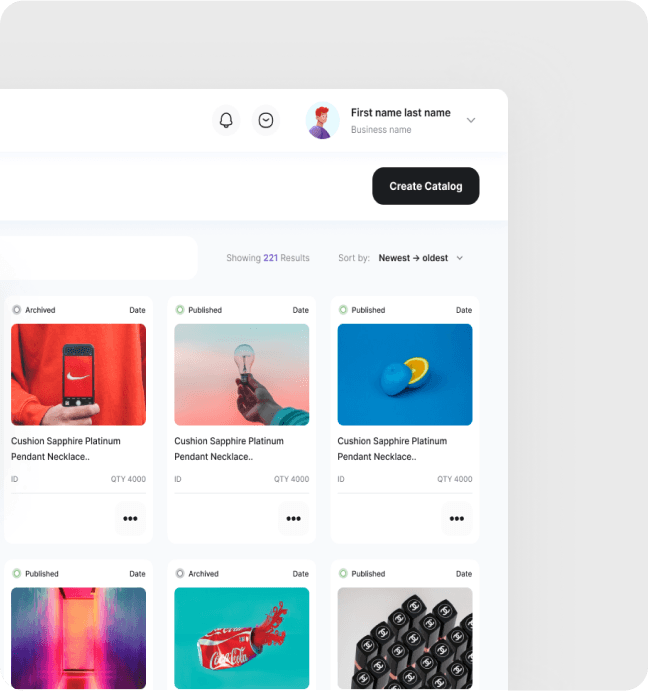
Digital Catalogs
Digital Catalogs
Sellers can create, edit, and manage product listings with complete metadata and visuals.
Sellers can create, edit, and manage product listings with complete metadata and visuals.
Sellers can create, edit, and manage product listings with complete metadata and visuals.
User Problem:
Manual product listing and catalog updates were time-consuming
User Problem:
Manual product listing and catalog updates were time-consuming
Problem it solves:
Real-time product updates enhance visibility and reduce dependency on offline communication.
Problem it solves:
Real-time product updates enhance visibility and reduce dependency on offline communication.
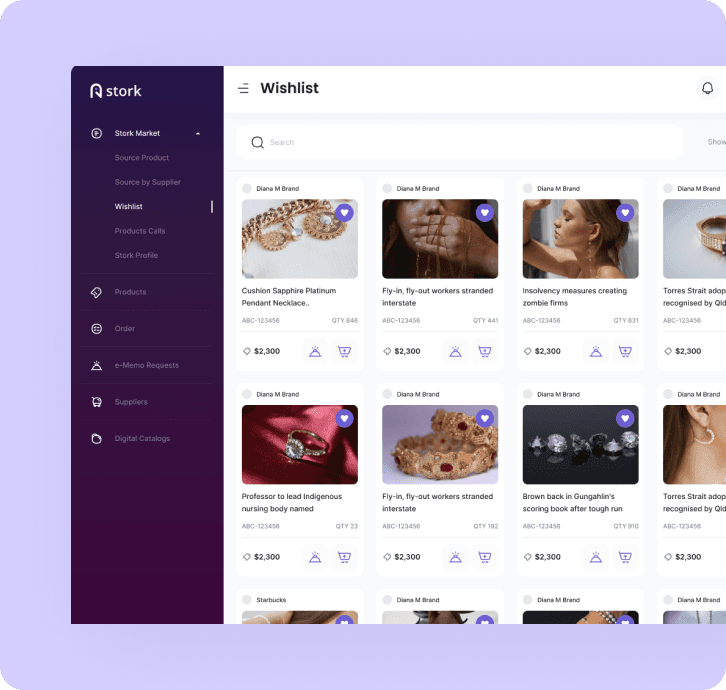
Stork Market Directory
Stork Market Directory
Buyers explore supplier listings and directly engage with preferred partners.
Buyers explore supplier listings and directly engage with preferred partners.
Buyers explore supplier listings and directly engage with preferred partners.
User Problem:
Buyers explore all listed sellers and connect based on their preferences.
User Problem:
Buyers explore all listed sellers and connect based on their preferences.
Problem it solves:
A searchable marketplace opens new business channels and scalable growth.
Problem it solves:
A searchable marketplace opens new business channels and scalable growth.
Results & Impact
Results & Impact
Over the past year, the platform has driven a 40% increase in buyer engagement, streamlined order processing by 30%, and enhanced inventory accuracy through real-time supplier integration. These advancements have not only improved operational efficiency but have also strengthened relationships between buyers and wholesalers, reinforcing Stork’s role as a game-changer in the B2B eCommerce landscape.
Over the past year, the platform has driven a 40% increase in buyer engagement, streamlined order processing by 30%, and enhanced inventory accuracy through real-time supplier integration. These advancements have not only improved operational efficiency but have also strengthened relationships between buyers and wholesalers, reinforcing Stork’s role as a game-changer in the B2B eCommerce landscape.
Over the past year, the platform has driven a 40% increase in buyer engagement, streamlined order processing by 30%, and enhanced inventory accuracy through real-time supplier integration. These advancements have not only improved operational efficiency but have also strengthened relationships between buyers and wholesalers, reinforcing Stork’s role as a game-changer in the B2B eCommerce landscape.
A seamlessly connecting buyers and suppliers, the platform has accelerated transactions, optimized inventory management, and strengthened industry relationships, setting a new benchmark for intelligent and scalable wholesale solutions.
A seamlessly connecting buyers and suppliers, the platform has accelerated transactions, optimized inventory management, and strengthened industry relationships, setting a new benchmark for intelligent and scalable wholesale solutions.
A seamlessly connecting buyers and suppliers, the platform has accelerated transactions, optimized inventory management, and strengthened industry relationships, setting a new benchmark for intelligent and scalable wholesale solutions.
24%
24%
Reduction in order processing time
Reduction in order processing time
Reduction in order processing time
18%
18%
Increase in buyer satisfaction
Increase in buyer satisfaction
Increase in buyer satisfaction
20%
20%
Increased repeat order rate
Increased repeat order rate
Increased repeat order rate
27%
27%
Improved order management efficiency
Improved order management efficiency
Improved order management efficiency